
Gift Voucher User Guide
For Administrators
Introduction
Voucher Management
Sell a Voucher
Complimentary Vouchers
Manage Gifts
Manage Gift Categories
Manage Promotions
Promotion Features
- Callout wording
- Schedule Promotion dates
- Voucher validity
- Custom monetary voucher settings
- Code mode
- Web shop settings
Enabling Promotions
Tracking Promotions
Reporting
Resources
Manage Users
Billing
Web Shop
Voucher Template
Tracking Promotions
Notifications
An email is sent out to the Sales contact listed in the portal on Manage contacts each time a gift voucher is sold. When vouchers are sold at a reduced price, the email shows the face value and the price paid (sale price) for the voucher.
If a monetary voucher has been purchased, the confirmation emails sent to purchasers show the face value and the price paid. If an experience voucher has been purchased, the confirmation emails sent to purchasers show the price paid.
Voucher detail
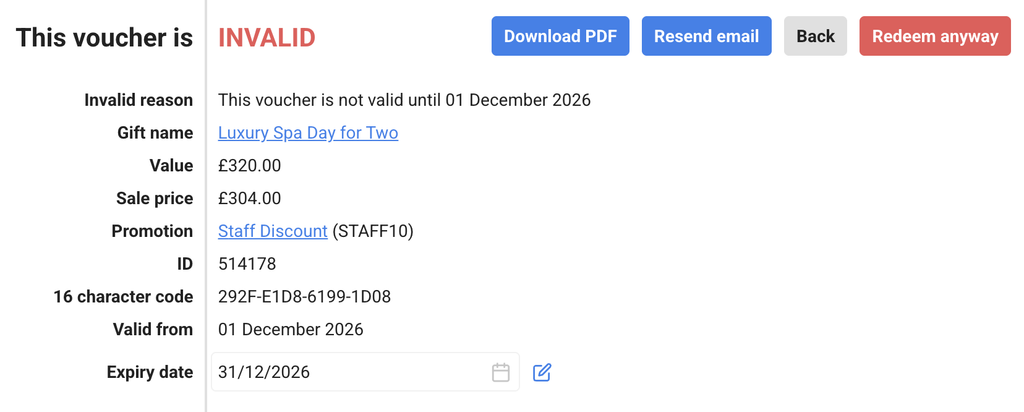
When a gift voucher is sold at a reduced price (or added value is made available for monetary values), the face value and sale price are displayed on the Voucher detail page. If the redemption period is set for dates in the future, the voucher will have a status of Invalid prior to the start date of this period and Valid during the period. Administrators are able to redeem these vouchers in the system regardless of the Invalid status, but Front Desk Users and Redeemers do not have this facility. The validity dates are also displayed on this screen.
Reporting
Gift table
The gift table tab shows which promotions have been enabled on each gift item. Click on the name of the promotion to view further details, including the dates the promotion ran and its aspects.
The promotions tab on the Manage gifts page shows an overview of the number of vouchers sold in any promotion.
Sales page
All data relating to sales from promotions is available in the CSV file on the Sales page. This is available by clicking on the blue Download CSV button. The face value column shows the amount the business is liable for. The sale price column shows the amount paid to the business for the vouchers. If no promotions have been run, the amounts in these two columns are the same. The data in the CSV file can be filtered and sorted to assess the success of a sale.